Breadstick 1.9.9: GPU Acceleration and Googlebooks

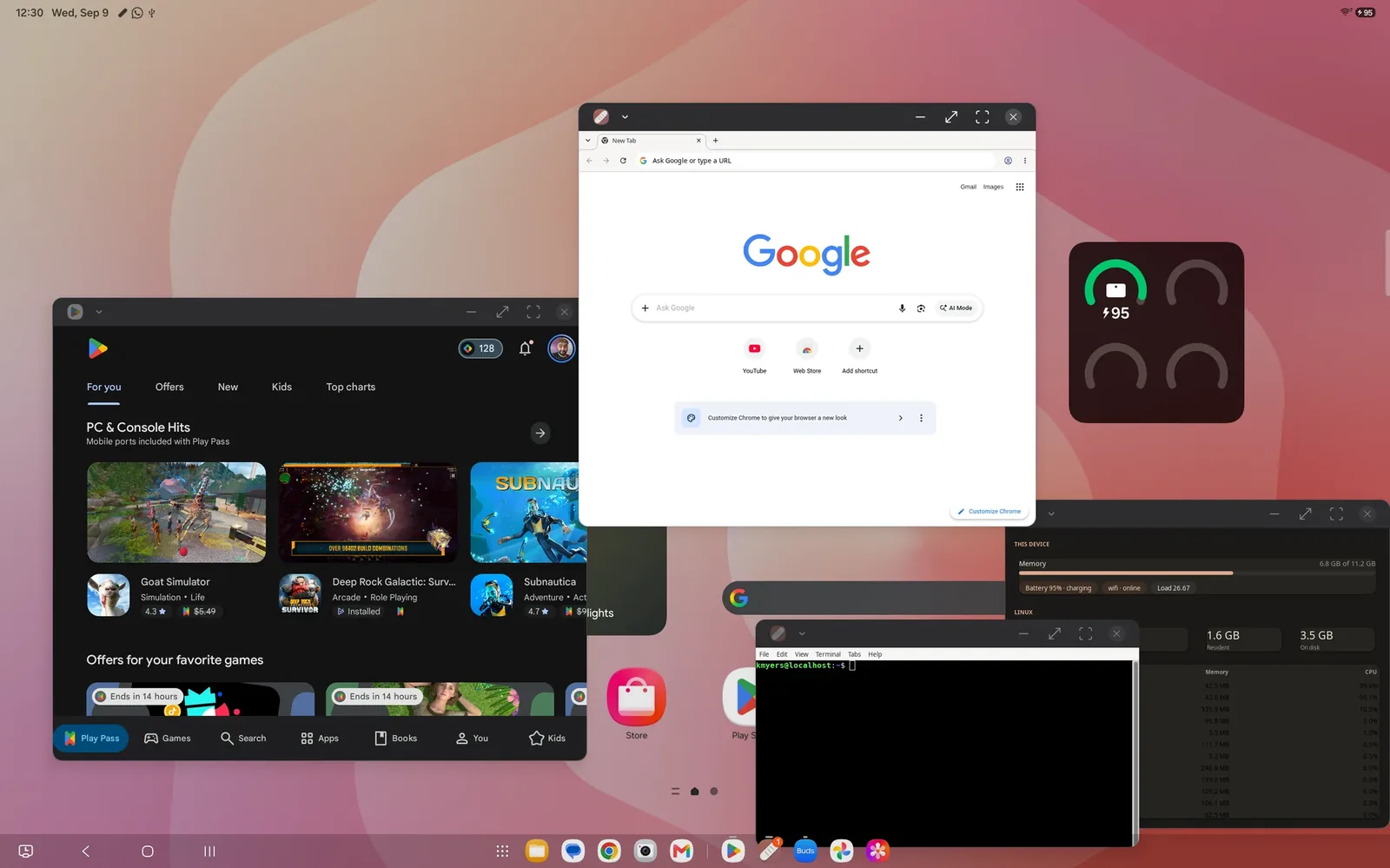
Breadstick 1.9.9 is rolling out on Google Play today. If your device updates apps automatically, it is already on its way; if not, open Breadstick in the Play Store and tap Update. It follows 1.3.0 and carries everything since: Linux apps that draw with your graphics chip, Breadstick on Googlebooks, and a set of fixes for work profiles and newer devices.
Linux apps on your graphics chip
Until now, every Linux app in Breadstick drew everything with the processor. With GPU acceleration, new in Breadstick Pro, Linux apps can draw with your device’s graphics chip instead, through OpenGL 2.1 and OpenGL ES.
Graphics chips and their drivers vary a lot from one device to the next, so Breadstick does not guess. It tests yours: it draws the same scenes on the graphics chip and on the processor, compares them, and times light and heavy drawing. The test runs by itself, once, while Breadstick is open, and acceleration turns on where it ran stably. Graphics in Settings shows the result, the apps using the GPU, and a switch. You do not need Pro to run the test, so you can see how your own device does before you decide.
Here is what the test measured on our devices on October 6, heavy drawing on the graphics chip against the same drawing on the processor:
- Galaxy Tab S11 Ultra (Mali): about 3x
- Pixel 10 Pro XL (PowerVR): 2.5x
- Dell XPS Googlebook (Adreno X1-85): 1.8x
- Galaxy Z Fold 7 and Galaxy Z Tri-Fold (Adreno 830): 2.8x to 8.8x
The gain is in 3D-heavy apps. Light drawing is another story: on some chips it ran slower on the graphics chip than on the processor, between 0.4x and 1.2x on the same devices, so an app that draws a few simple shapes gains little or nothing.
What it does not do yet
- Web browsers stay on the processor. Chrome, Chromium and Firefox draw the way they always have.
- Programs that need OpenGL 3 or newer stay on the processor too.
- It is a beta on every chip. Breadstick has not yet verified any chip and driver for good, the ones above included, so a pass is your own device’s result. If something draws wrongly or closes, turn it off for that app or everywhere.
Breadstick also keeps an eye on it. If the graphics server crashes three times in ten minutes, or a desktop start with the GPU does not come up twice in a row, it goes back to the processor on its own. Turn it off while apps are open, and they finish on the GPU while the apps you open next use the processor. The GPU acceleration guide covers all of it.
Breadstick on Googlebooks
Breadstick now runs on Googlebooks, in Android’s own desktop windowing. Every Linux app opens in its own window, with its title and icon, at the right size, and dialogs keep their own size.
- Touchpads. On Android 14 and later, two-finger scrolling and taps work.
- Alt+F4 closes a floating window, on a Googlebook and on Samsung DeX alike.
- Full screen takes the whole display.
- An earlier process warning. The warning before Android’s process limit starts sooner there, because the system’s own virtual machines take part of the limit.
- No back camera needed. Breadstick no longer requires one, so Google Play offers it on laptops.
Fixes worth knowing about
- Work profiles, Secure Folder and Private Space. Installing packages with apt and
sudoworks there now. - Archives on newer devices.
taranddpkg-debfailed with “Cannot change mode”; they work now. - Restoring a backup somewhere else. Restoring into another Linux system, a work profile or Secure Folder no longer affects the original, and systems restored that way before are repaired on their first start.
- Remembered window places (Pro) are no longer overwritten by an app’s splash screen or dialogs. LibreOffice Writer used to reopen at the size of its splash screen.
- Alt+Tab no longer opens the menu of the Linux app underneath.
- 16 KB memory pages. Breadstick is ready for phones that use them.
The Linux side
Breadstick’s Linux system updates itself through apt, and version 1.0.24 went out today with the Linux half of GPU acceleration. It changes nothing for anyone still on 1.3.0, and new installs start on it.
Everything is listed in the changelog.
Update Breadstick on Google Play, and tell us how it goes at hello@breadstick.io, especially if you try it on a Googlebook or a graphics chip we have not tested. 🥖
Written by Keith I Myers
Creator of Breadstick
Keith builds Breadstick, the app that brings real Debian Linux apps to Samsung DeX as native windows.
All posts by Keith I Myers →