Coding on a Samsung Tablet: Why I Left My Laptop at Home

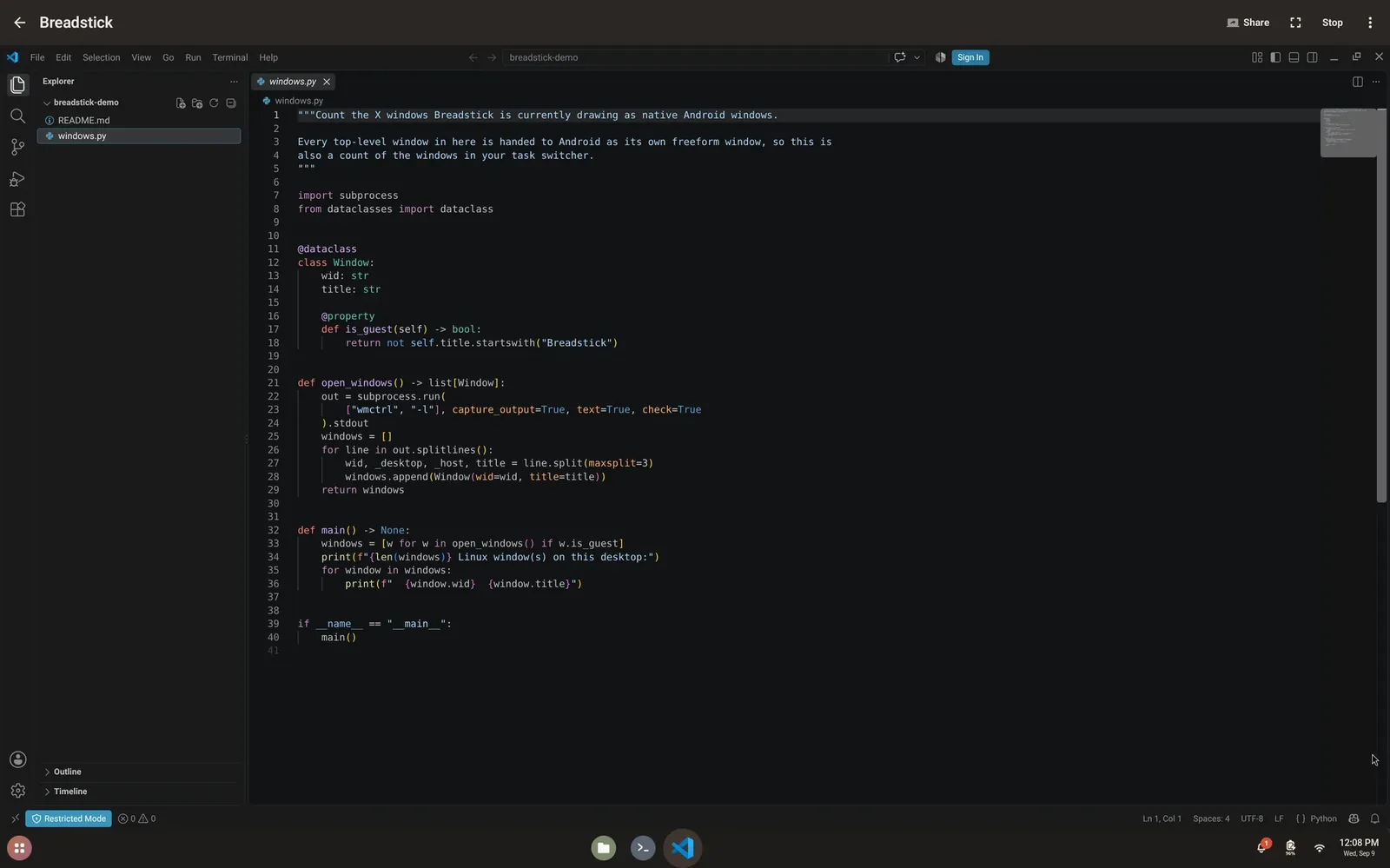
Can a Samsung tablet replace a laptop for coding? Last weekend, it did for me. With Breadstick, VS Code, compilers and language runtimes, Git and SSH all run on the tablet itself, in real Debian Linux. This is the first post in a series about things Breadstick lets your phone or tablet do that it could not do before, and it starts with the one closest to my own work.
The weekend the laptop stayed home
I live a few hours from the Canadian border, so last weekend we took a quick trip up to Montreal. We drove, and I was the passenger, of course. Normally I would not leave the house without a laptop, in case something needs fixing on the road. This time I took a risk and packed only my Samsung Galaxy Tab S11 Ultra and Samsung’s Pro Keyboard for it, running Breadstick.
Links to the tablet and keyboard are affiliate links: as an Amazon Associate I earn from qualifying purchases.
Nothing broke, as it turned out. But I still got a few things done from the passenger seat on the drive up, the same way I work at my desk: I build and test locally in Breadstick, push to GitHub, and GitHub Actions picks it up from there.
VS Code and other IDEs on a Samsung tablet
Breadstick runs real Debian Linux on Android, so the tools are the real desktop ones, not mobile look-alikes or web versions. VS Code is a tap away: the Development bundle in Recommended apps installs it from Microsoft’s own repository, so it keeps updating the way it would on a PC. The same bundle adds git, Python 3 with pip and venv, build tools, and nvm for Node.js.
If you prefer something else, Debian’s own editors and IDEs install with apt, among them Geany, Kate, GNU Emacs, Vim, Neovim, KDevelop and Qt Creator. The app catalog has a whole section of Linux development tools to browse.
Python, Node.js, Go, Rust, Java and more
Debian 13 ships Python 3.13, Node.js 20, Go 1.24, Rust 1.85, OpenJDK 21, Ruby 3.3 and PHP 8.4, all built for the ARM64 processor in your device, so nothing is emulated. Frameworks and libraries arrive the way they do on any Linux PC: pip in a virtual environment for Django or Flask, npm for React or Express, cargo for Rust crates, and Go modules for Go. SQLite and Redis are there for local data; there is no systemd, so you start Redis from the terminal.
One tip: keep your projects in your Linux home folder. It is much faster than Android’s shared folders for builds and for repositories full of small files.
Git, GitHub and SSH
Git works as it does anywhere, and so does GitHub’s own command line tool, gh. Mercurial and Subversion are there too, if your team uses them.
The Breadstick Terminal is a Debian shell with tabs, and ssh reaches your servers from it. With Pro, it adds split panes and saved SSH hosts. It works the other way as well: turn on Breadstick’s SSH server and you can reach the Linux system on your tablet from another computer on the same network.
Programming on Samsung DeX, one window per app
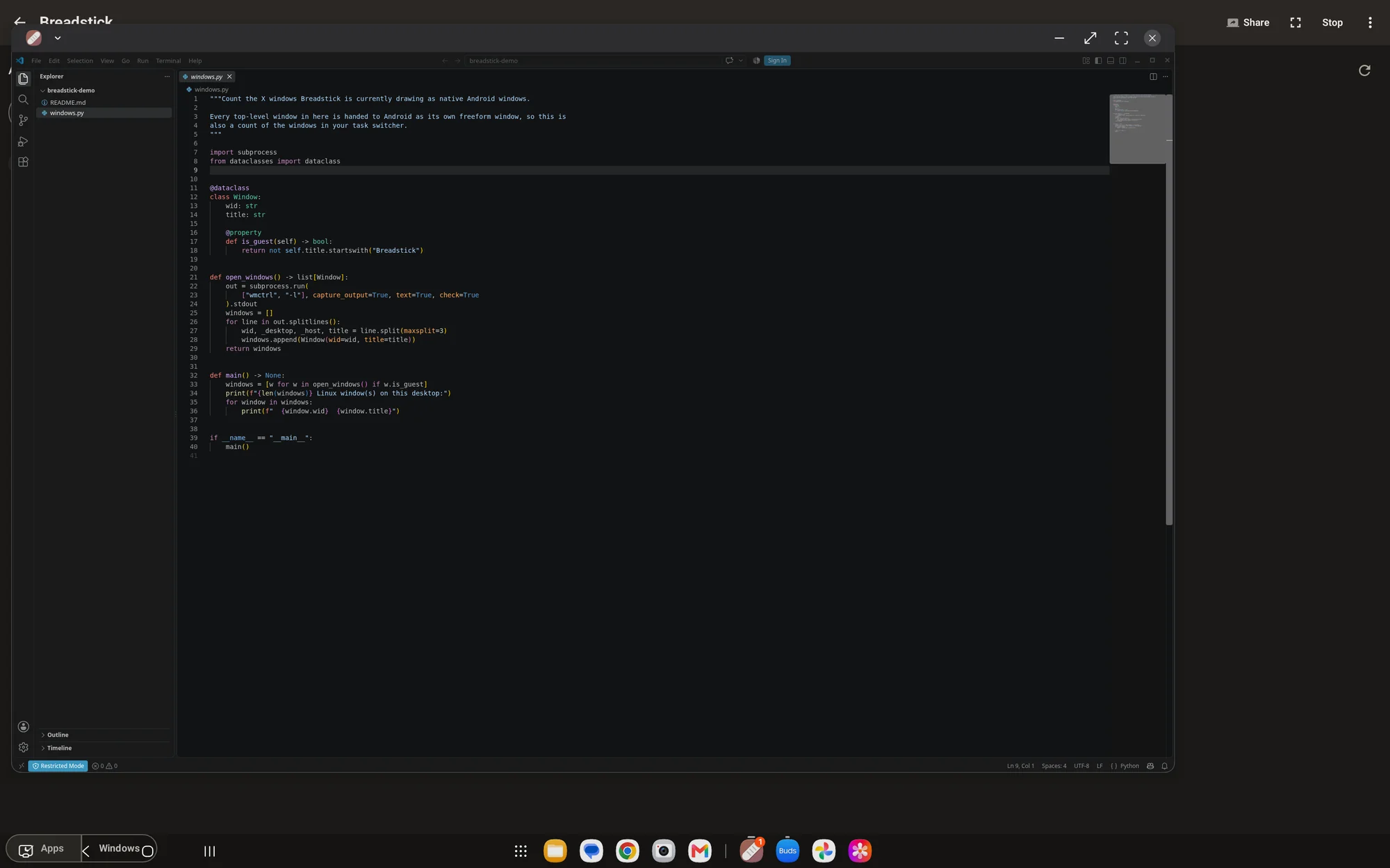
On Samsung DeX, Floating mode opens each Linux app as its own window, right beside your Android apps. VS Code can sit beside your Android browser, with a terminal next to it, each with its own place in the taskbar. If you would rather have a classic Linux desktop, Desktop mode has one, with a panel, an app launcher and a file manager.
What stays in CI
One thing to know before you plan around it: Docker and other containers need kernel features Android does not give apps, so they cannot run in Breadstick. That fits the way I already work: I build and test locally, and after a push, GitHub Actions takes it from there. Anything that needs containers can run in CI the same way, or on a server you reach over SSH. The limits page covers this and the rest honestly.
Try it on your own tablet
Breadstick runs on your device’s own processor and memory, so try it on the tablet or phone you already have before buying anything for it. A keyboard makes a big difference. The getting started guide walks you through the first run.
The laptop stayed home, and the work still got done. Get Breadstick on Google Play and see what your tablet can do. 🥖
Samsung, Galaxy and DeX are trademarks of Samsung Electronics Co., Ltd. Visual Studio Code is a trademark of Microsoft Corporation, and GitHub is a trademark of GitHub, Inc. Breadstick is not affiliated with or endorsed by Samsung, Microsoft or GitHub.

Written by Keith I Myers
Creator of Breadstick
Keith builds Breadstick, the app that brings real Debian Linux apps to Samsung DeX as native windows.
All posts by Keith I Myers →