Breadstick 3.0 is coming in early November

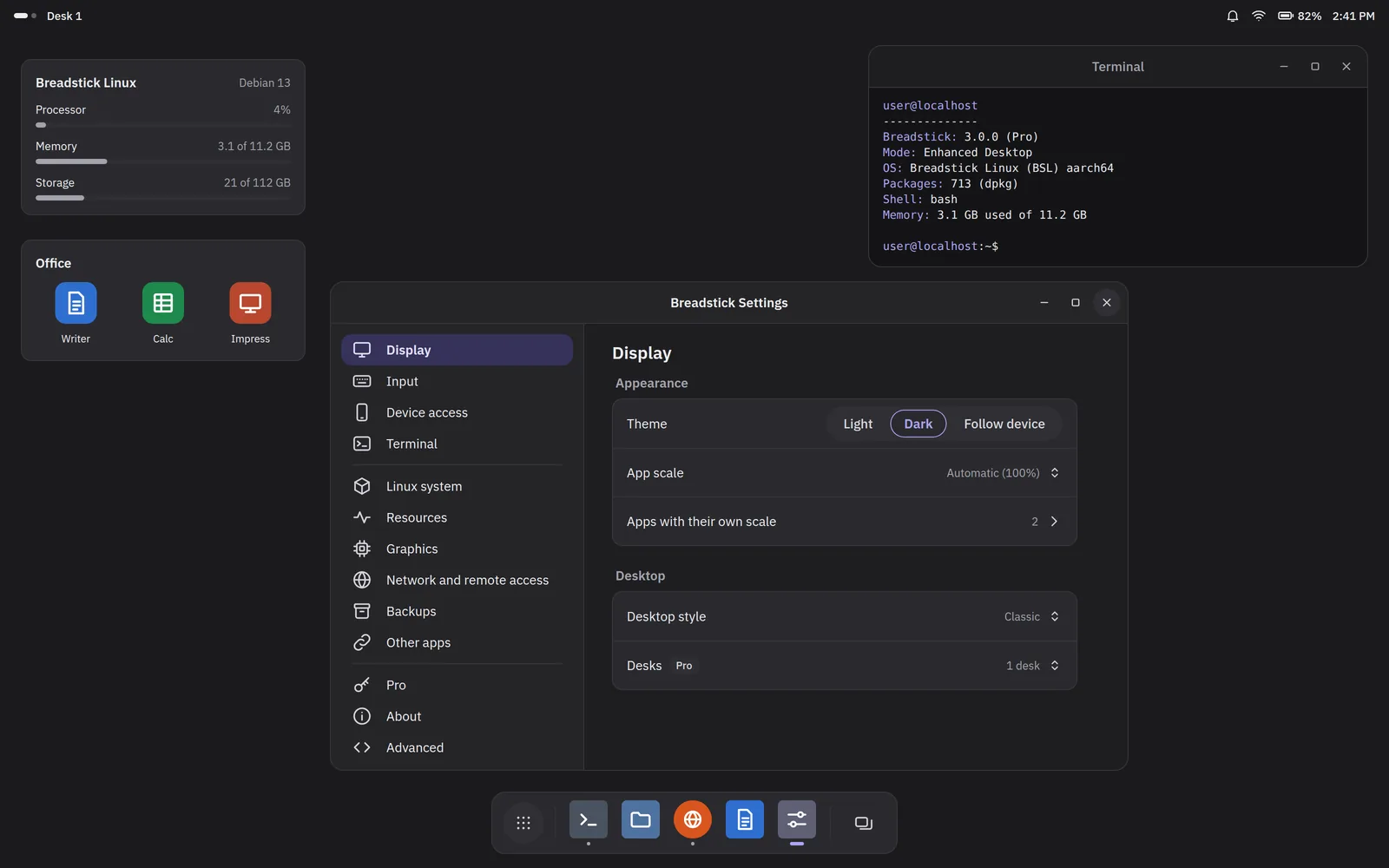
Breadstick 3.0 will be on Google Play in early November, as a free update. It is the biggest release we have ever made, by a wide margin: a new design, Breadstick in 35 languages, faster graphics, and a long list of ways your phone, tablet or Googlebook now reaches into Linux. It is also the last big release for a while. After 3.0 we will spend our time making what is there better.
Here is a look at what is coming.
A new look, everywhere
Breadstick is made of four parts that have never quite looked like one product: the Android app, the Linux desktop, the Enhanced Desktop and this website. In 3.0 they share one design. It is calmer and flatter, closer to the Linux apps you run, with a new indigo accent on cool grays, IBM Plex as the typeface, and proper light and dark versions of everything. Choose Dark in Breadstick and the app, the Linux desktop and your Linux apps go dark together, right away. This website gets the new design on release day too, in light and dark.
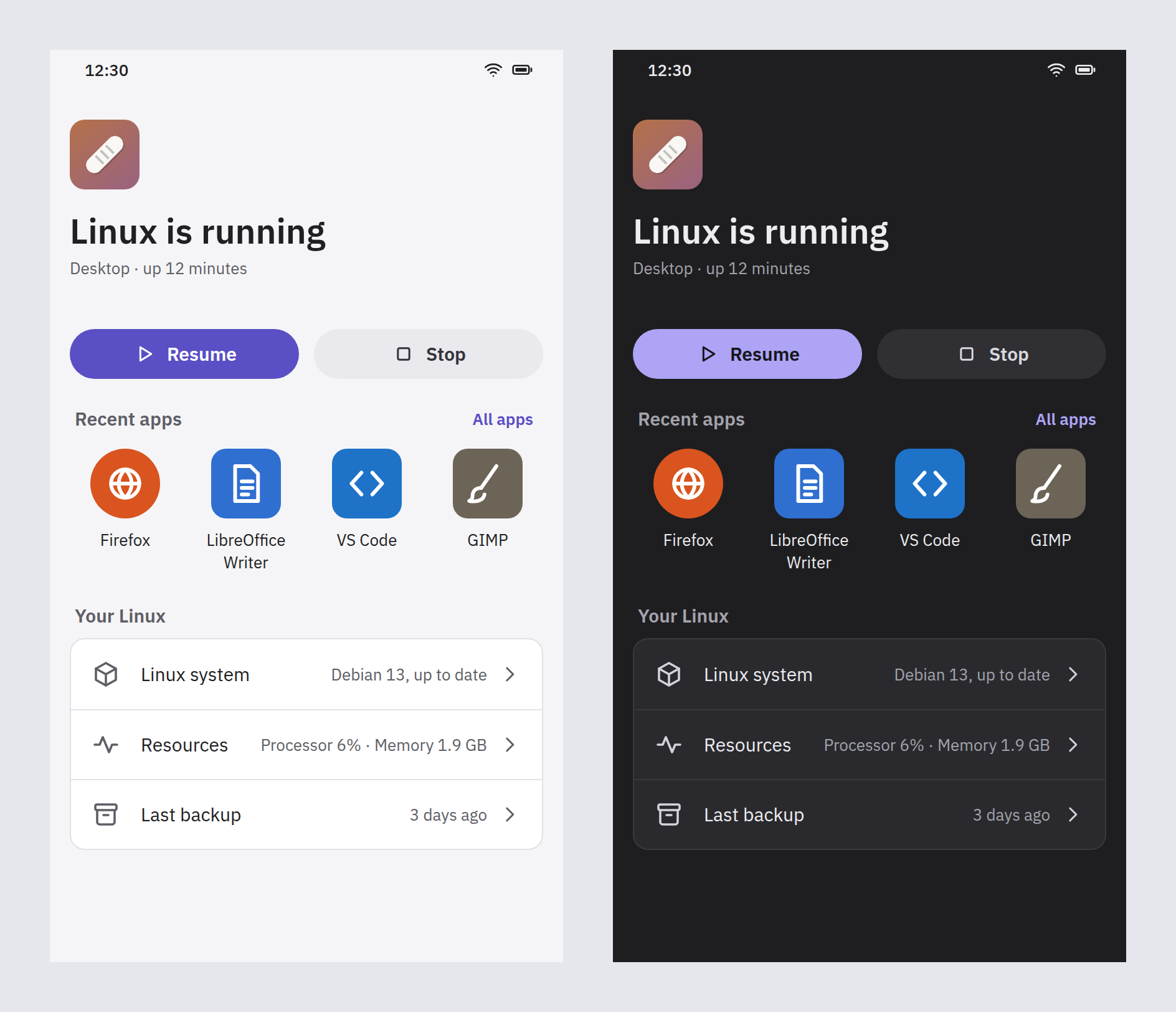
Getting around is simpler too. Four places, always in the same spot: Home, Apps, Terminal and Settings. Apps has your Linux apps, with a Get apps tab beside them. And we took out a lot of words. Screens that explained themselves in a paragraph now just show you what they control.
Breadstick in your language
Breadstick 3.0 speaks 35 languages: Arabic, Bengali, Bulgarian, Chinese (Simplified and Traditional), Czech, Danish, Dutch, English, Finnish, French, German, Greek, Hebrew, Hindi, Hungarian, Indonesian, Italian, Japanese, Korean, Malay, Norwegian, Persian, Polish, Portuguese (Brazil and Portugal), Romanian, Russian, Slovak, Spanish, Swedish, Thai, Turkish, Ukrainian, Urdu and Vietnamese.
It goes further than the app’s own screens:
- Breadstick’s Linux programs are translated too. Breadstick Settings, About, Updates, the launcher, the notification center and the desktop’s menus speak your language, not only the Android app.
- Linux follows your choice. Pick a language and Linux uses it for the apps you open next. You can list several, in order, so a program without your first choice falls back to your second instead of English.
- Language support for your apps, in one tap. Breadstick can install the translations, spell-check dictionaries and fonts that LibreOffice, Firefox and other Linux apps need for your languages.
- Your formats, not just your words. Region, currency, 12 or 24-hour time, date format and measurement units follow your choice in Linux.
- Right to left, and every script. Arabic, Hebrew, Persian and Urdu run right to left, and Chinese, Japanese and Korean get their fonts installed automatically.
- The app can have its own language. Run Breadstick in one language while Android uses another.
Some languages are marked beta until native speakers have reviewed them. If you see a translation that could be better, tell us and we will fix it.
Settings, the same inside and out
Breadstick’s settings now look and work the same in the Android app and in Breadstick Settings inside Linux: the same pages in the same order, with search across all of them. Find what you want in one and you know where it is in the other. On a tablet or a Googlebook the pages sit in a sidebar; on a phone they open one at a time.
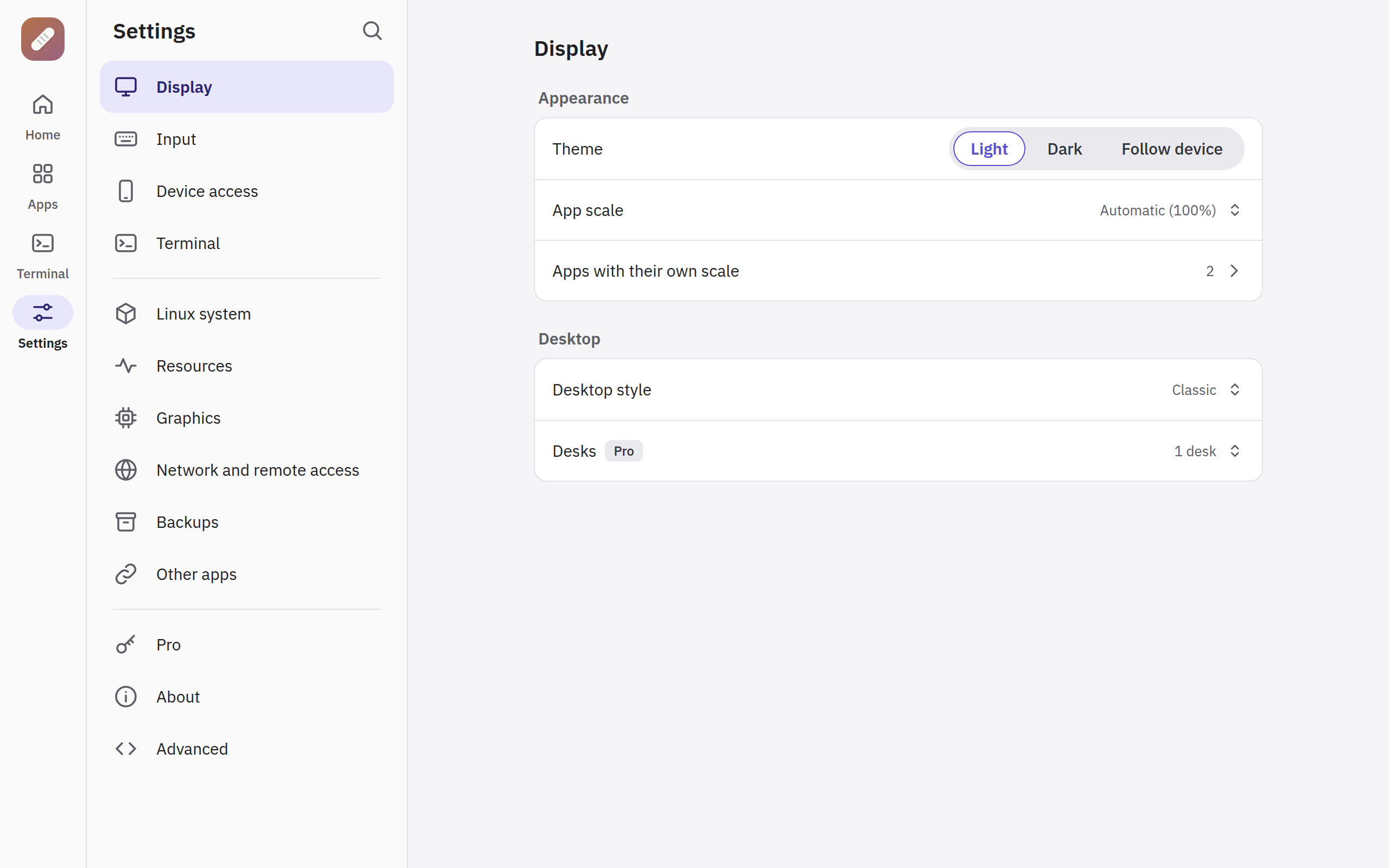
Nearly everything now changes in place. Turn on dark mode, a controller, the camera or GPU acceleration, or buy Pro, and it applies while Linux runs. No restart.
Faster graphics
On Snapdragon devices, Linux apps will be able to draw with the device’s own graphics chip through OpenGL and Vulkan, not only through our translation layer. On the first device we have measured, a demanding 3D scene ran thirteen times faster than drawing with the processor. Intel Googlebooks get an updated graphics driver as well. We are testing on more phones and tablets now, and Breadstick only switches the GPU on where it proves faster. GPU acceleration stays part of Pro.
More of your device, inside Linux
- Your camera as a webcam. Video calls in Linux browsers and apps can use the front or back camera.
- The microphone, only when it is used. Breadstick opens Android’s microphone only while a Linux program is actually recording, so the green indicator means what it says.
- Game controllers. Bluetooth and USB controllers work in Linux games and emulators, up to four at once, with rumble.
- A stylus as a pen. Pressure, tilt and the eraser reach drawing apps such as GIMP, Krita and Xournal++, and a hand resting on the screen is ignored.
- Touchpad mode. Turn the screen into a laptop touchpad for Linux windows: one finger moves a pointer, tap to click, two fingers to scroll or right-click. On-screen mouse buttons are there when you want them.
Android widgets on your Linux desktop
The Enhanced Desktop, Breadstick’s own desktop for tablets, Googlebooks and external displays, now holds real Android widgets. Open the widget gallery and add any widget your other Android apps offer: your calendar, the weather, notes, music controls, your to-do list. They are live, the same widgets you would put on your home screen, and you can tap and scroll them right there beside your Linux apps.
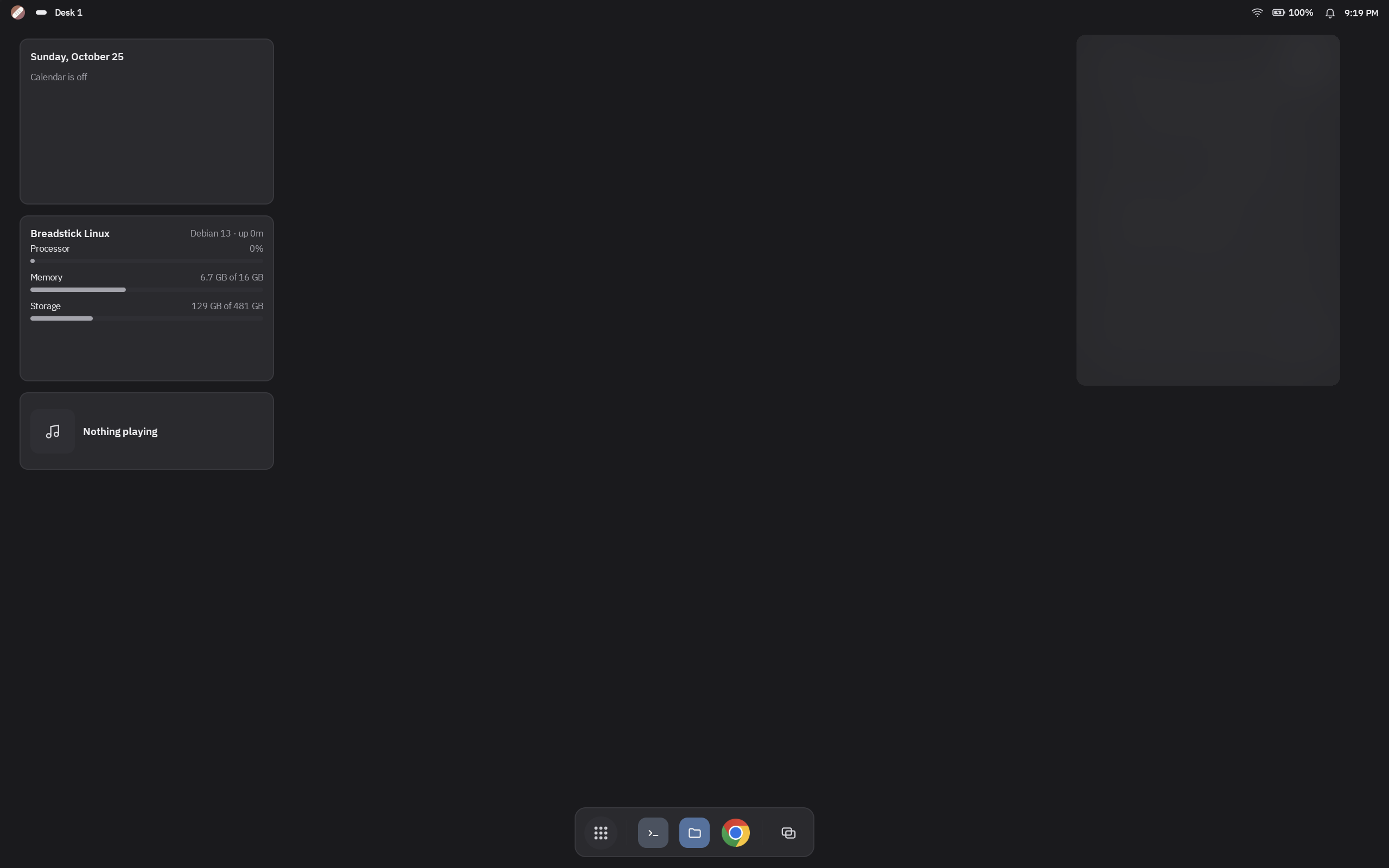
They sit beside Breadstick’s own widgets: an agenda, your Linux system at a glance, Now playing for music in Linux, a note, a folder of apps, and your desks.
The Enhanced Desktop
The rest of the Enhanced Desktop grows up in 3.0 too. It brings more of your Android world in beside Linux: your Android apps in the launcher and dock, a notification center, quick settings, and several desks to move between. It gets the new design, with solid surfaces and one clock.
For developers and power users
- Linux services. Programs that expect to run as services can start, stop and come up with Linux the way they do on a computer, with
systemctlandjournalctl. - Breadstick for AI assistants. A built-in MCP server lets an AI assistant you trust run commands, read and write files, and see windows in your Linux system, on your device, with a key you control.
- A better Terminal. Shift and function keys in the Enhanced Terminal’s key row, and touch scrolling that works in full-screen programs and tmux.
- App scale, your way. Set a default size for Linux apps, and give any app its own.
Games, experimental
3.0 opens the door to more gaming on Breadstick. Alongside controllers and faster graphics, Steam setup is smoother on Intel Googlebooks, and Steam’s own ARM build can now be set up on Snapdragon devices. Both are experimental and not supported, and they need Android’s background process limit turned off. We will say more when they are ready.
Steadier underneath
A lot of 3.0 is work you will never see: restoring a backup can no longer lose your Linux system if the device restarts halfway, sound recovers on its own when it stops, leftover processes from a crash are cleaned up, and Breadstick makes sure Linux is up to date before it relies on anything new.
When
Early November, as a free update on Google Play. Some of these features are part of Pro, and the release notes will say which. We will post the full list of changes on release day. Until then, if something in Breadstick gets in your way, tell us at hello@breadstick.io. Much of 3.0 started that way.

Written by Keith I Myers
Creator of Breadstick
Keith builds Breadstick, the app that brings real Debian Linux apps to Samsung DeX as native windows.
All posts by Keith I Myers →