On-Device AI in Breadstick 3.1: Build Linux Apps on Gemini Nano

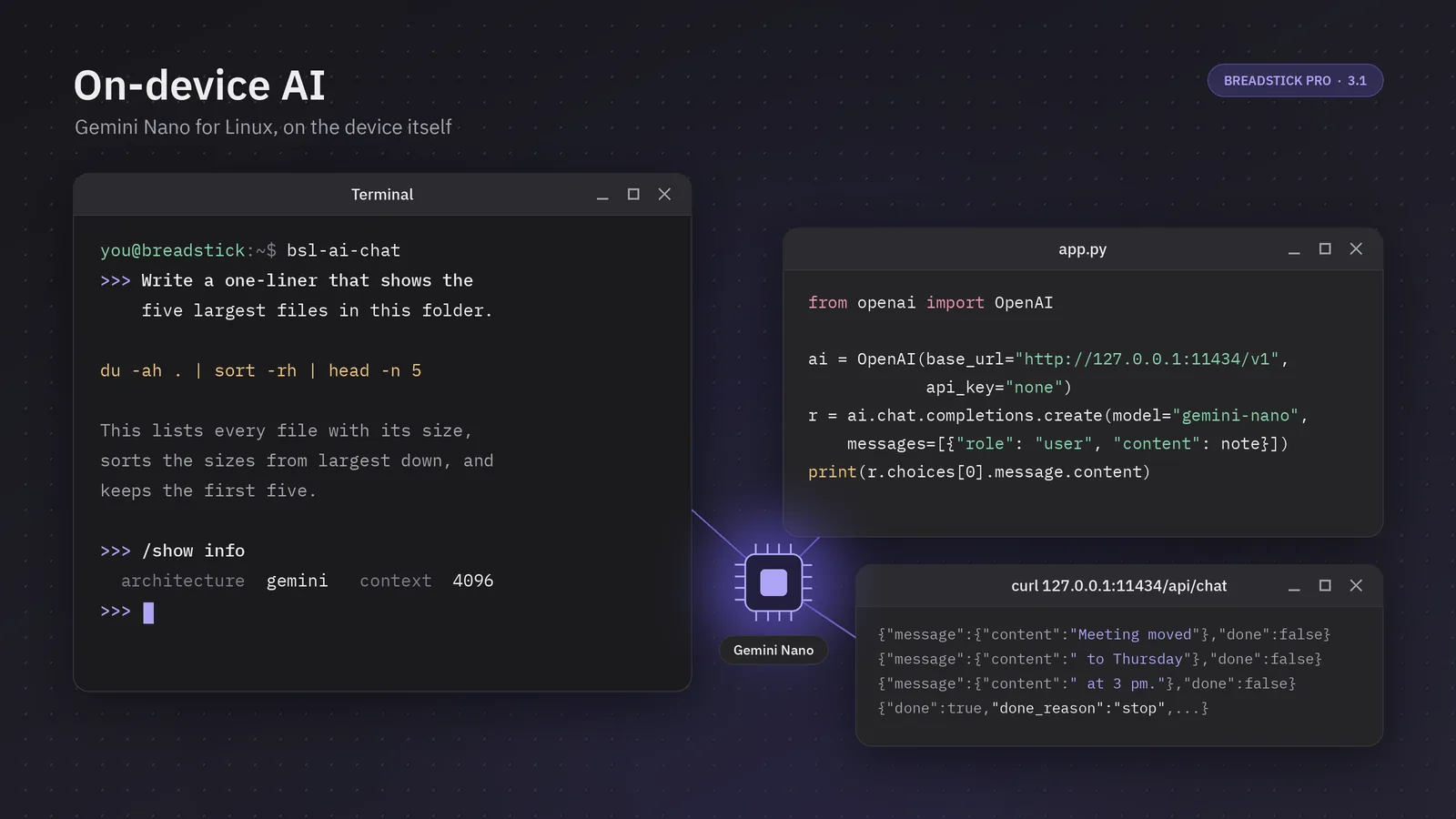
Breadstick 3.1 gives Linux programs your device’s own AI model, Gemini Nano. It is the model Android already runs on the device, served to Linux at http://127.0.0.1:11434 through Ollama’s API and OpenAI’s chat API, so there is no cloud account, no API key and no model to download yourself.
On-device AI is a Breadstick Pro feature, built for professionals and developers. It is experimental, and it runs on the devices Android offers Gemini Nano to: Googlebooks, and the Pixel and Galaxy phones on Google’s list. On many of today’s flagship devices it is very fast, and nothing you send it leaves the device.
Here it is on a device:
This post shows two ways to use it: a chat in the Terminal, and the API your own programs can build on.
Turning it on
In Breadstick, go to Settings > Advanced > On-device AI (Experimental). If the model row says Download, tap it once; Android fetches the model itself. Then turn on On-device AI. The section shows the address, the port (11434 unless you change it) and an optional key.
From then on, every Linux program Breadstick starts has OLLAMA_HOST set to that address. A shell that was already open can pick it up with eval "$(bsl-ai env)", and bsl-ai on its own tells you whether the model is on and answering.
A chat in the Terminal
The quickest way to try it is bsl-ai-chat, which arrived with today’s Linux update (1.0.41). If you know ollama run, you already know it:
bsl-ai-chat
Type at the >>> prompt and the answer streams in as the model writes it. The conversation carries on until you leave, so follow-up questions work the way you expect. Wrap a long message in """ to write it over several lines, put an image file’s path in a message to show the model a picture (where your device’s model takes images), and use /set system to give it standing instructions. /? lists the rest.
It is just as useful in scripts. With a question after it, bsl-ai-chat answers once and exits, and anything you pipe in goes along with the question:
git diff | bsl-ai-chat -s "You review code. Be brief." "What does this change do?"
tail -n 200 build.log | bsl-ai-chat "Why did this build fail?"
cat meeting-notes.txt | bsl-ai-chat "Turn these notes into a short list of action items."
Each of these runs entirely on the phone or Googlebook, with no account and no network connection.
An API you already know
Your own programs can use the model through an API that is familiar to developers: Breadstick speaks Ollama’s API and OpenAI’s chat API, which many existing libraries and tools already support.
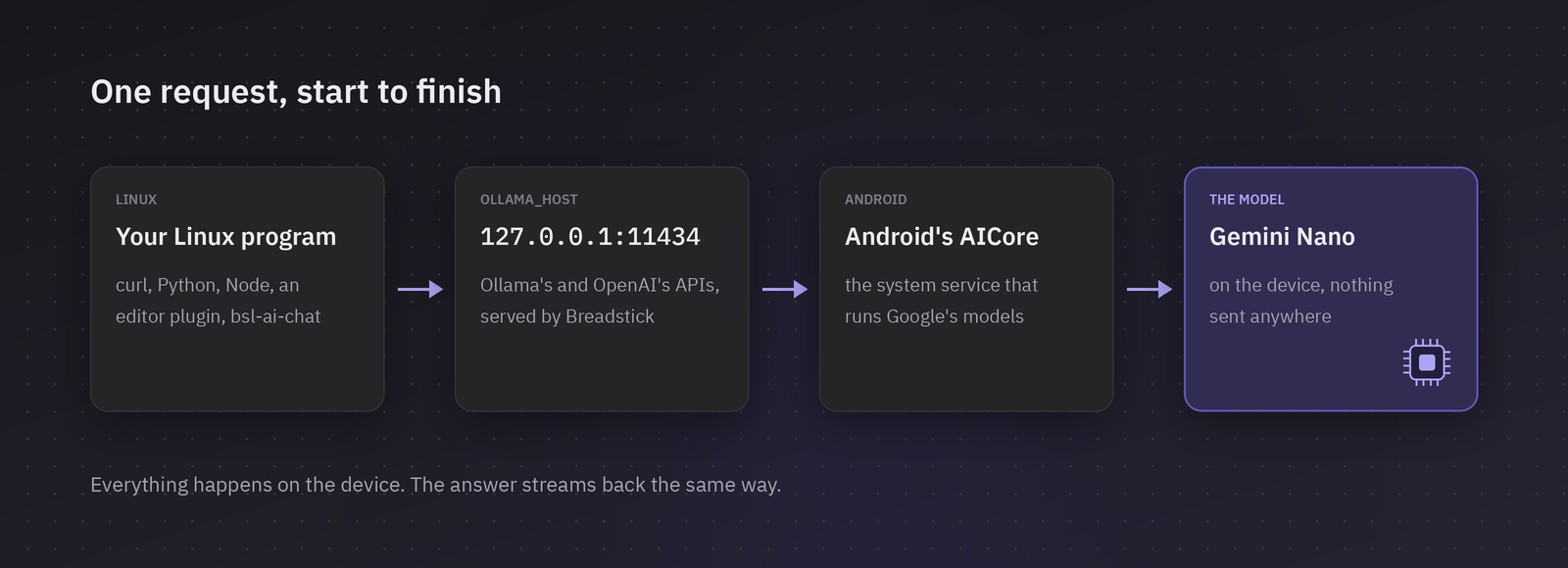
A program written for a local Ollama, or for OpenAI’s chat API, works with Breadstick once you point it at the address. The model is called gemini-nano.
With curl and Ollama’s API:
curl http://127.0.0.1:11434/api/chat -d '{
  "model": "gemini-nano",
  "messages": [{"role": "user", "content": "Explain what a symlink is in two sentences."}]
}'
The answer streams back one JSON object per line, as Ollama’s does, with "done": true and token counts at the end. Add "stream": false to get it in one piece.
With OpenAI’s Python client:
import subprocess
from openai import OpenAI

diff_text = subprocess.run(["git", "diff", "--staged"], capture_output=True, text=True).stdout
ai = OpenAI(base_url="http://127.0.0.1:11434/v1", api_key="none")
reply = ai.chat.completions.create(
    model="gemini-nano",
    messages=[
        {"role": "system", "content": "You write commit messages. One line, under 70 characters."},
        {"role": "user", "content": diff_text},
    ],
)
print(reply.choices[0].message.content)
And from Node.js, streaming as the model writes:
const res = await fetch("http://127.0.0.1:11434/api/chat", {
  method: "POST",
  body: JSON.stringify({ model: "gemini-nano", messages: [{ role: "user", content: prompt }] }),
});
const decoder = new TextDecoder();
let buffer = "";
for await (const chunk of res.body) {
  buffer += decoder.decode(chunk, { stream: true });
  let end;
  while ((end = buffer.indexOf("\n")) >= 0) {
    const line = buffer.slice(0, end);
    buffer = buffer.slice(end + 1);
    if (line) process.stdout.write(JSON.parse(line).message?.content ?? "");
  }
}
Editor plugins, chat apps and agent frameworks that let you point them at an Ollama server or an OpenAI-compatible endpoint can use it the same way. Images go in images (Ollama) or as image_url data URLs (OpenAI) on devices whose model takes them, and temperature, top_k, seed, stop and the output length are honored.
Targeting Breadstick
If you build Linux tools, this gives your users on supported devices a language model they already have, with no download, no API key and no cost per request. These make it easy to build for:
- Finding it. Read
OLLAMA_HOST. If it is set andGET /api/tagslistsgemini-nano:latest, the model is ready.bsl-aiexits 0 when the model is answering, so a shell script can check withif bsl-ai >/dev/null; then .... - Falling back. When on-device AI is off, the address simply does not answer. Treat that like a missing Ollama and fall back to whatever your program does without a model.
- Checking what it takes.
POST /api/showlists the model’s capabilities, includingvisionon devices whose model takes images, and its context length. - Errors that say what to do. A busy model answers 429 with
Retry-After, and a request made while Breadstick is not in front answers 503. Both explain themselves in the response.
Some limits are worth designing around. Requests must be short: about 4,000 tokens of input, and in a long chat the oldest turns are dropped to fit. The model answers one request at a time, with up to four more waiting their turn. There is no tool calling, JSON mode or embeddings yet; a request that asks for them gets an error saying so. And Android lets only the app on screen use the model, so it answers while a Breadstick window is in front: the Linux desktop, a floating Linux window or the Terminal.
Within those limits, the model is good at the work developers reach for small models to do: summarizing, rewriting, classifying, extracting fields from text, explaining errors, drafting commit messages and answering questions about a document. Because it runs on the device, it keeps working on a plane, on a train and anywhere else without a connection, and it never sees a network.
Private by design
What you send the model, and what it answers, stays on the device. Gemini Nano runs inside Android’s own AI service, and Breadstick serves it only at 127.0.0.1, on the device. The only download is the model itself, from Google, when you ask for it. Breadstick’s build carries no usage reporting for this feature.
Get started
On-device AI needs Breadstick Pro and a device Android offers Gemini Nano to. Update Breadstick to 3.1 from Google Play, take the Linux update under Settings > Linux system > System updates if bsl-ai-chat is not there yet, and turn the feature on under Settings > Advanced.
The full reference, with every endpoint, the key, the error codes and the limits, is in On-device AI. If you build something on it, tell us at hello@breadstick.io. We would love to see it.

Written by Keith I Myers
Creator of Breadstick
Keith builds Breadstick, the app that brings real Debian Linux apps to Samsung DeX as native windows.
All posts by Keith I Myers →