Breadstick 3.1 is here

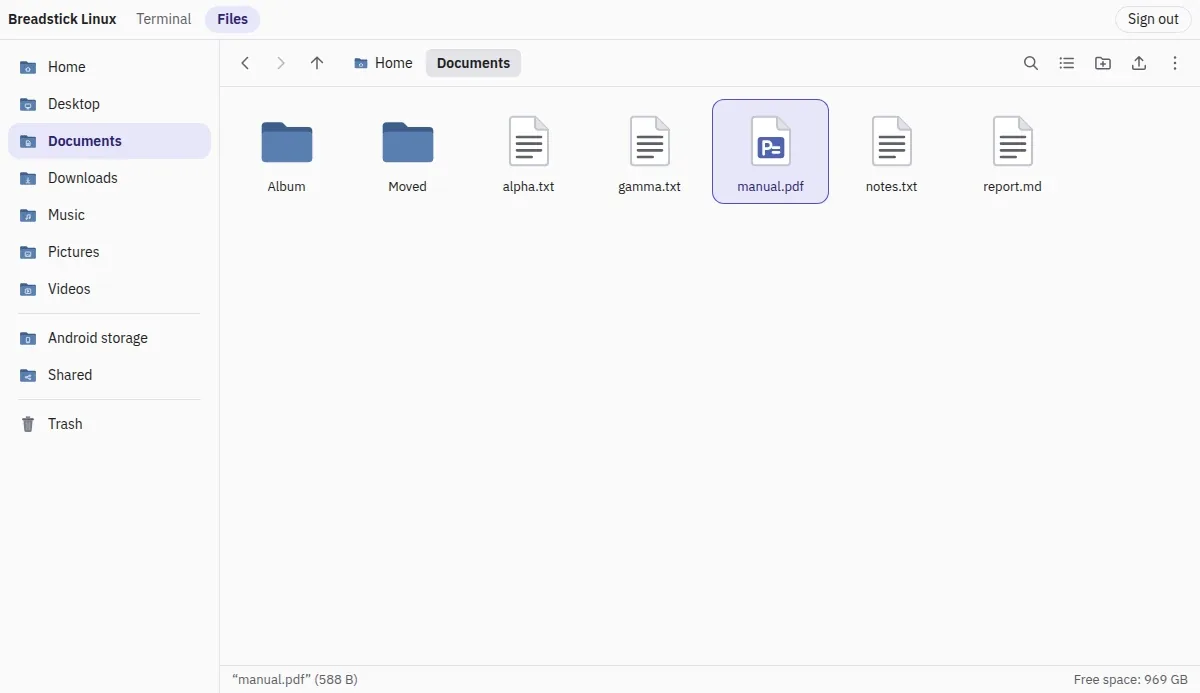
Breadstick 3.1 is on Google Play. It is a free update. If your device updates apps automatically, it is already on its way; if not, open Breadstick in the Play Store and tap Update.
3.0 was the biggest release we have made, so 3.1 is a smaller one, and it is mostly your requests: reach your Linux from another computer, type on the keyboard you own, and make the pointer the size you want.
Your Linux, in a web browser
Under Settings > Network and remote access > Web access, Breadstick can now serve two things to any browser on the same network. Chrome, Firefox and Safari all work, and the other computer needs nothing installed.
- The web terminal, free. A full Linux terminal in the browser, with colors, the mouse in programs like htop, vim and mc, links you can click, and every key a shell needs. Each browser tab gets a shell of its own, up to four at once. Reload the page or lose Wi-Fi and you come back to the same shell, with whatever was running still running.
- The web file browser, Pro. Your Linux files in a browser: browse, upload, download, rename, copy, move, the Trash, previews and search. It is laid out like Files on the Linux desktop.
Both use one address and one password, over HTTPS, and each is off until you turn it on. The Web access page has the details, including how to reach your device from outside your network (use a VPN, never a forwarded port).
The keyboard you own
Linux now types with the layout of your physical keyboard: German QWERTZ, French AZERTY, Dvorak and dozens more. Automatic follows the layout you chose in Android’s own settings, and you can pick another from the list under Settings > Input. A new layout applies at once, in every Linux window. A layout with another alphabet, such as Russian, Greek or Arabic, is set beside English, so you can still type commands; Alt+Shift switches between them. See Keyboard layout.
Pointer size and phone orientation
Settings > Display has two new choices. Pointer size sets the size of the mouse pointer, from Small to Extra large, and applies at once. Desktop orientation, on phones, keeps the desktop upright or sideways instead of turning with the phone. Both are explained in Modes.
On-device AI, for Pro
On devices where Android offers Gemini Nano, Linux programs can use it. Breadstick puts an Ollama-compatible address on the device, so a chat app, an editor plugin or a script that already talks to Ollama or to OpenAI’s chat API can use it as it is. The model runs on your device, and no data leaves it.
It is experimental, and only on the devices Android offers it to: Googlebooks, and the Pixel and Galaxy phones on Google’s list. On every other device Breadstick shows nothing for it. Find it under Settings > Advanced, and read On-device AI first.
Smaller things
- A full-screen Windows game in a Floating window keeps the pointer.
- Save logs now saves everything as one file, which is easier to attach to an email.
- A Linux system with i386 turned on, as Steam needs, no longer prints a notice about Breadstick’s repository at every update.
- A first install from the base image includes Debian’s security updates.
Thank you
The web terminal, the keyboard layouts and the pointer size all began as emails and reviews. Thank you. Keep them coming.
Everything is in the changelog.
Update Breadstick on Google Play, and tell us how it goes at hello@breadstick.io.

Written by Keith I Myers
Creator of Breadstick
Keith builds Breadstick, the app that brings real Debian Linux apps to Samsung DeX as native windows.
All posts by Keith I Myers →